> For the complete documentation index, see [llms.txt](https://help.tacinsight.com/fast-weigh-knowledge-base/llms.txt). Markdown versions of documentation pages are available by appending `.md` to page URLs; this page is available as [Markdown](https://help.tacinsight.com/fast-weigh-knowledge-base/references/copy-of-api-documentation.md).
# Copy of API Documentation
{% hint style="info" %}
*To add the API module to your Fast-Weigh subscription, contact us at 865-219-2980 or* [*support@tacinsight.com*](mailto:mailto:support@tacinsight.com)*.*
{% endhint %}
[Fast-Weigh](https://fast-weigh.com/) is a modern cloud-based truck ticketing, ordering, and dispatching platform.
The Fast-Weigh GraphQL APs allow system integrators to interface with the Fast-Weigh data model to extend functionality and/or extract data for third-party use.
## Authentication
The Fast-Weigh REST & GraphQL API services use token-based authentication with a custom `x-api-key` HTTP header record. The token should be included with every call.
{% hint style="info" %}
**Basic Authentication has been deprecated.**
{% endhint %}
We have transitioned from using Basic Authentication with username/password credentials to token-based authentication. Existing integrations will continue to work, but please note that Basic Auth has been deprecated and will be removed in the future.
## Graph QL
**Your endpoint:**
You can find your endpoint listed on the [API Info](https://tacinsight.zohodesk.com/portal/en/kb/articles/149-api-overview) page under the settings gear of the Fast-Weigh Web Portal.
**Don't see API Info on your web portal?**
1. You may not be an admin of your Fast-Weigh account. Check with a known admin to see if they can set up this key.
2. Your company's account may not have this enabled. If this is the case you will need to contact your sales or onboarding rep to get it enabled.
The endpoint should look something like this: [`https://server-name.fast-weigh.dev/v1/graphql`](https://server-name.fast-weigh.dev/v1/graphql)
**API schema explorer:**
Your credentials will allow you to use the Insomnia tool to build queries. There, you can dive into the data model docs as well as test queries with the live editor.
## REST API
The REST API generally handles CREATE and UPDATE calls.
The OpenAPI/Swagger docs can be found here:
### Create an API key and get an Endpoint
On the Fast-Weigh Web Portal, go to the [API Info](https://portal.fast-weigh.com/APIInfo) page under the settings gear.
You should see the GraphQL Endpoint listed here as well as any available keys.
To create a new key click the "+ New Key" button on the grid and fill in the info required.
**Don't see API Info on your web portal?**
1. You may not be an admin of your Fast-Weigh account. Check with a known admin to see if they can set up this key.
2. Your company's account may not have this enabled. If this is the case you will need to contact your sales or onboarding rep to get it enabled.
### Making requests
When making requests to the GraphQL or REST APIs include the following header:
```
x-api-key: your-key-goes-here
```
**Download tooling**
We recommend using a tool called [Insomnia Client](https://insomnia.rest/products/insomnia) for query development and debugging. It has some great built-in features tailored for join REST and GraphQL development that make it quick and easy to get started.
[Grab the free download here](https://insomnia.rest/download)
### **Setup development workspace**
Create a new request collection to house your queries.

**Create a request**
In this Request Collection, you'll define your queries.
*Note: Make sure you remember to set the HTTP method to POST and the body to GraphQL Query.*

**Add your endpoint and API key**
In your request, fill in the URL/endpoint and go to the "Header" tab to paste your API key.

**View documentation and enable autocompletion**
Once your API key and endpoint are pasted in, you can view the always-up-to-date data model docs without leaving Insomnia.
Back on the "GraphQL" tab you should see a "schema" option at the top right of the query box.
Clicking on that will give you the option to refresh the schema. Doing so will fetch the latest data model from the server and build live documentation.

Once you have refreshed, you'll have access to the documentation as well as query auto-completion within the editor.

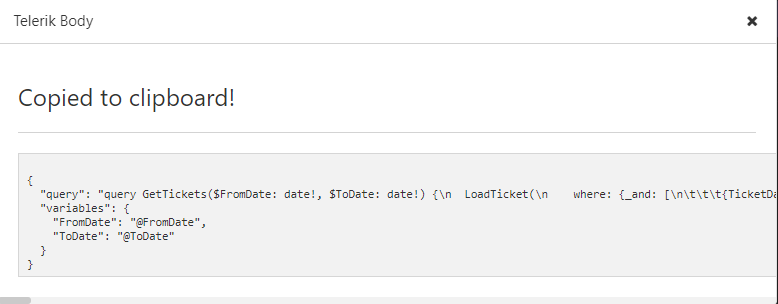
**Adding the Copy Telerik Body Plugin**
Once you have written your query and are ready to use to it build a [Telerik Data Source](/fast-weigh-knowledge-base/references/deprecated-graphql-documentation/reporting-with-graphql.md), you will need the "Fast-Weigh: Copy Telerik Body" Plugin to generate your Telerik Data Source Body.
On the top of the screen, click Application > Preferences.
On the Insomnia Preferences pop-up, navigate to Plugins.

In the npm-package-name field, enter `insomnia-plugin-fast-weigh` and click Install Plugin.
You should now see the plugin in the list.

Close the Preferences pop-up and right-click an existing Request name. You should now see the Fast-Weigh: Copy Telerik Body plugin as an option.