# How to Create and Pay ticket from New Ticketing App

## How To Create and Pay Ticket from Fast-Weigh

{% stepper %}
{% step %}

### Click \[ Create and Pay Ticket ]

{% hint style="warning" %}
This button will only appear if the ticket **Pay Type** is **Cash, Check,** or **Credit Card**
{% endhint %}

<figure><img src="https://490131596-files.gitbook.io/~/files/v0/b/gitbook-x-prod.appspot.com/o/spaces%2F0LJDMCSYOqplCEgCo73X%2Fuploads%2FkEcZAkrQkoNWG6Yaa6ZY%2Fimage_2025-07-24_151010357.png?alt=media&#x26;token=0b7e15c5-32b1-46db-bb2d-b0a7227a2283" alt=""><figcaption></figcaption></figure>
{% endstep %}

{% step %}

### Redirect to Portal

After clicking the **\[ Create and Pay Ticket ]** button, a new tab should open up in your browser to the **Fast Weigh Portal**, with the ticket created in the scale app already invoiced and selected

<figure><img src="https://490131596-files.gitbook.io/~/files/v0/b/gitbook-x-prod.appspot.com/o/spaces%2F0LJDMCSYOqplCEgCo73X%2Fuploads%2F4EJVAhrRTvtxONXQm3Bc%2Fimage.png?alt=media&#x26;token=53a7aa38-18aa-475a-988b-0355da3b5c84" alt=""><figcaption></figcaption></figure>

{% hint style="info" %}
If this new tab doesn't open, make sure popups are enabled on your browser
{% endhint %}
{% endstep %}

{% step %}

### Select a Payment Method

Select the appropriate **Payment Method** from the dropdown

<figure><img src="https://490131596-files.gitbook.io/~/files/v0/b/gitbook-x-prod.appspot.com/o/spaces%2F0LJDMCSYOqplCEgCo73X%2Fuploads%2Fycnf7e4xRcyUpg8Lw5Qw%2Fimage.png?alt=media&#x26;token=cf645c60-914d-4a80-a573-be460dc09154" alt=""><figcaption></figcaption></figure>

<table><thead><tr><th width="168">Payment Method</th><th>Description</th></tr></thead><tbody><tr><td><strong>Cash</strong></td><td>The Customer is paying in Cash, no extra action is needed in the Web Portal</td></tr><tr><td><strong>Check</strong></td><td>The Customer is paying via Check, no extra action is needed in the Web Portal</td></tr><tr><td><strong>Card</strong></td><td>The Customer is paying via Credit Card. When you click Create Payment you will be prompted to enter their Credit Card information to process the payment</td></tr><tr><td><strong>ACH</strong></td><td>The Customer is paying via ACH. When you click Create Payment you will be prompted to enter their ACH information to process the payment</td></tr><tr><td><strong>Terminal</strong></td><td>The Customer is paying via a connected Card Reader or other POS Terminal</td></tr></tbody></table>
{% endstep %}

{% step %}

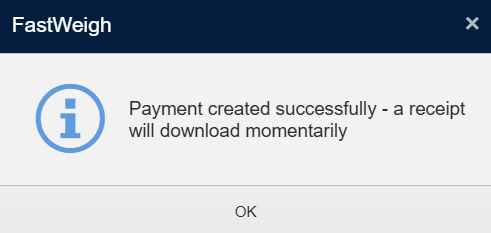
### Click \[ Create Payment ] & \[ OK ]

<figure><img src="https://490131596-files.gitbook.io/~/files/v0/b/gitbook-x-prod.appspot.com/o/spaces%2F0LJDMCSYOqplCEgCo73X%2Fuploads%2FJo4sLFEuIlwcWPmvucqh%2Fimage.png?alt=media&#x26;token=0694bf3d-8782-4cc0-b836-e5088fef9e7b" alt=""><figcaption></figcaption></figure>

<figure><img src="https://490131596-files.gitbook.io/~/files/v0/b/gitbook-x-prod.appspot.com/o/spaces%2F0LJDMCSYOqplCEgCo73X%2Fuploads%2F60QwzIsuLpwZ4GFOvHl3%2Fimage.png?alt=media&#x26;token=a08c5b82-8dd0-47c5-a61c-9614d8371f5b" alt=""><figcaption></figcaption></figure>
{% endstep %}

{% step %}

### Finish

A Receipt PDF should now be downloaded

<figure><img src="https://490131596-files.gitbook.io/~/files/v0/b/gitbook-x-prod.appspot.com/o/spaces%2F0LJDMCSYOqplCEgCo73X%2Fuploads%2FFSbWrWTkLDvaakFws5hs%2Fimage.png?alt=media&#x26;token=c6257aab-69ca-4449-961a-f0518179195a" alt=""><figcaption></figcaption></figure>
{% endstep %}
{% endstepper %}

***

## Related Guides

{% content-ref url="../how-to-guides/how-to-create-new-records/creating-payments" %}
[creating-payments](https://help.tacinsight.com/fast-weigh-knowledge-base/how-to-guides/how-to-create-new-records/creating-payments)
{% endcontent-ref %}

***

## References

{% content-ref url="../references/web-portal/billing-ar/new-payment" %}
[new-payment](https://help.tacinsight.com/fast-weigh-knowledge-base/references/web-portal/billing-ar/new-payment)
{% endcontent-ref %}

{% content-ref url="../references/ticketing-app/application/lanes-and-ticketing" %}
[lanes-and-ticketing](https://help.tacinsight.com/fast-weigh-knowledge-base/references/ticketing-app/application/lanes-and-ticketing)
{% endcontent-ref %}