> For the complete documentation index, see [llms.txt](https://help.tacinsight.com/fast-weigh-knowledge-base/llms.txt). Markdown versions of documentation pages are available by appending `.md` to page URLs; this page is available as [Markdown](https://help.tacinsight.com/fast-weigh-knowledge-base/references/ticketing-app/setup/loadout-control-setup.md).
# Loadout Control Setup
## Sync Config Setup
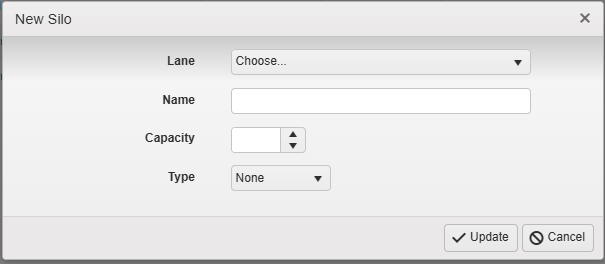
Admin Settings > Sync Configs > Silos
Click New Silo
Assign the Lane
Name the Silo (typically numbered)
Set the Capacity in tons (200 tons for example)
Set Type to "Pulse" (unless inventory is being monitored outside Fast-Weigh, then set to none)
## Server Settings
Go To Server Settings
Open Beta Features
Enable Add/Edit Silos
Go to the Manage Silos Section
Click Add Silo
Select a Silo from the List to see the full configuration options:
**Web Switch URL:** Static URL of Web Switch, Port is NOT required by default but may be needed depending on networking solution
**Freefall Amount:** (Weight Threshold in LBS/KG) amount of material left in the drop to trigger the gate to close.
**Auto Calculate Freefall:** When enabled, an algorithm adjusts the free fall amount automatically based on tolerance differences in previous drops.
**Sort:** Changes the order in which the silos are display on the ticketing screen
**Gate Relay #:** Relay Number must match the Local Relay # (not the Device #) for the silo gate
**Pulse Duration:** (In Seconds) When a request is made to open the gate, it is kept open for this duration. Requests are made every half second.
**Jog Time:** Amount of time the gate is held open when a Jog is manually triggered
**Slow Open Gate:** When enabled, a separate relay can be designated as a slow/partial gate opening
* **Slow Open Relay #:** Local Relay # (not the Device #) for slow/partial gate opening
* **Slow Jog Time:** Amount of time the gate is held open when a slow/partial Jog is manually triggered
**Default # of Drops:** Splits loads into number of drops
**Drop n %:** Drop percentages are automatically split equally between all drops, but can be configured to not be equal (for example with 3 drops: 1 - 40%, 2 - 30%, 3 - 30%)
**Safety Inputs:** Separate Pop up for configuring additional Safety Inputs, if the input state does not match, then Fast-Weigh will consider Loadout as NOT safe
* **Description:** Name of Safety input (Example: Photoeye)
* **Digital Input #:** Digital Local Input # (not the Device #)
* **Input State:** Indicate if On or Off is the safe state
**Safety Selector:** When enabled, a Digital Input can be configured to
* **Selector Digital Input #:** Digital Local Input # (not the Device #)
**Gate Timer:** (in Seconds) If no material is dropped within the time frame, the load is automatically cancelled
**Max Drop Timer:** (in Seconds) if the gate has been open for this long, the load is automatically cancelled
**Signal on Load Complete:** If enabled, the relay will be signaled when a ticket is created. Used for Horns or Traffic Lights
* **Load Complete Relay #:** Local Relay # (not the Device #)
* **Signal Duration:** (In Seconds) duration of load complete signal
**Load Lamp:** When Enabled, the silo card will display a button that can enable the lamp until the button is deactivated. Silo Lamps tell drivers which silo they will be loaded from if the scale has more than one silo.
* **Lamp Relay #:** Local Relay # (not the Device #)
* **Lamp Pulse Time:** *no longer supported*
**High Inventory:** When enabled, an indicator is displayed in app if a high inventory level is reached
* **High Inventory Digital Input #:** Digital Local Input # (not the Device #)
**Sync Status Updates to Portal:** *Not currently supported*